Organise your services
Programmes, services, locations and participation rules.

Sport needs speed and precision.®
Hércules™ · Institutional SaaS licensing
Manage your services, purchases and service delivery with the information you need to make decisions. License Hércules™ for the long term with the modules your institution needs; agree on implementation and integrations with Deporte Virtual®.

Hércules™ for your organisation
Discover how the Hércules™ divisions work together in each type of organisation.
Sports programmes, members and services across your locations.
Sports schools, tournaments and facility bookings in a private setting.
Programmes, facilities and organisations across your region.
Student wellbeing, gyms and university competitions.
Registers, sports programmes and national management.
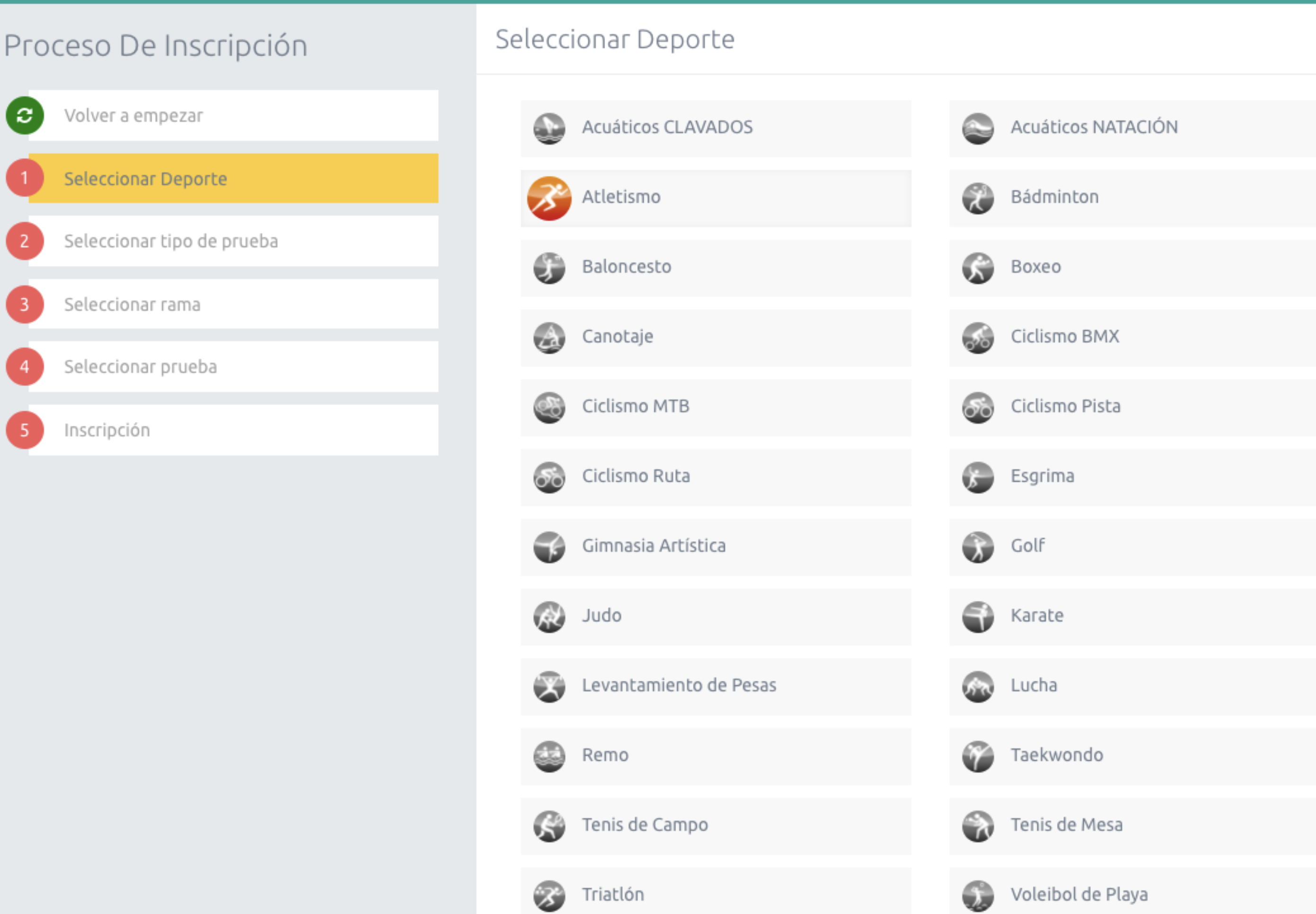
Selecting a sport is the first step. Next, participants choose the event type, gender category and event before completing registration.
To review your operations, choose the processes you need to connect: registration, service delivery or monitoring. The demonstration focuses on your organisation's modules and rules.
People, services and resources linked throughout your operations.
Programmes, services, locations and participation rules.
Participants, shopping basket and online payments for the services you sell.
Groups, spaces, coaches and activities.
Participation, attendance and configured reports.
Conceptual process diagram. Scope depends on the contracted modules and configuration.
Hércules™ e-commerce store
Link what someone buys to their participation in your organisation's courses, plans and activities.
Find the service by location, age, level and schedule.
A swimming course
Select participants and pay with the configured rates and benefits.
Participant registration and payment
Coordinate the group, coach and space for the activity.
Classes for the selected course cycle and group
Check attendance and reports; manage changes according to service rules.
Participant attendance and continued enrolment
The journey depends on the contracted modules and rules. Payments require an account and configuration with the provider. Connections to membership, ERP or invoicing systems are assessed per project; recording a return in Hércules™ does not automatically issue a refund through the payment gateway.
Experience with Colombian family compensation funds
We have implemented Hércules™ for sports and recreation management: sports schools, gyms, facilities, tournaments and day passes. We connect the online store and corporate sales with scheduling, customer service and reporting, according to each Colombian fund's scope.

Gyms with Hércules™
Manage plans with benefits across centres, bookings and attendance. Configure capacity, schedules and permissions for the teams running each location.
Present your locations and sell plans and services through a branded portal. Explore an example of a network of 10 or more gyms and its connection to member service and reporting by centre.
Sports schools and academies
Organise cycles, levels and locations. Connect the course catalogue with registration, instructor assignments, attendance and assessment.

Facilities and bookings
Check availability, schedule bookings and manage conflicts across facilities, zones and subzones.
Select the capabilities that fit the way you work.
Organise forms, requirements, capacity and approvals according to each programme's rules.
Manage cycles, groups, coaches and attendance to monitor your activities.
Offer time-based or usage-based plans, session passes and open-practice slots with configurable rules.
Check availability and organise the internal allocation of spaces and staff.
Structure tournaments, schedules, results and standings according to configured formats.
Link commercial information, occupancy and attendance to review your service offering.
Standard describes a product capability; its activation and scope are agreed in the licence.
Define access by time or sessions, validity, locations and usage periods. Configure benefits and deferral conditions; participants can view their plans in the portal.
Modules, centres and rules are prepared for each organisation.
Offer packages of sessions with a balance and validity period. Link usage to bookings and attendance, and allow users to manage slots within defined time limits.
A session pass does not replace a booking. Open practice requires configured centres and schedules.
Organise instructors and support staff by profile, availability and shifts. Configure scheduling restrictions, manage exceptions and record changes.
Rules, fields and notifications specific to your organisation are assessed during implementation.
Prepare quotations including services, materials and spaces. Submit the proposal for approval or adjustment and turn sold services into operational orders.
The module requires configuration. Connections to invoicing, payment collection and suppliers are agreed per project.
Plans and session passes · Configurable standard capabilities
Time-based planAccess for a period, with defined benefits and limits.
Usage-based session passA balance of sessions with validity and usage conditions.
Choose a plan or session pass
The purchase activates the benefits, validity or uses defined for the service.
Select your slot
The participant chooses an available time. The centre's rules and the conditions of their plan or session pass apply.
Record participation
Attendance is linked to the service. For session passes, usage is managed according to bookings and configured rules.
Conceptual journey for services requiring a booking. Purchasing does not replace booking or confirm attendance. Schedules, limits, cancellations and returned session credits are configured per service. Activation and scope are agreed in the licence.
Staff scheduling · Configurable standard capabilities
Connect your staff's availability with the shifts and activities you need to cover.
Know who can deliver the service
Record when each staff member is available and unavailable. View their calendar within assigned permissions.
The coach is available in the afternoon.
Link people and services
Assign staff to shifts or sessions according to current profiles and configured restrictions. Review alerts and exceptions.
The coach is assigned to the swimming group and time slot.
Coordinate the day
See who is assigned to each session. Manage replacements and record changes to maintain continuity of service.
The team delivers the class and records any relevant changes.
Illustrative swimming class example with no real data. An assignment does not confirm that the service was delivered. Profiles, workload and availability rules, permissions and approvals are configured per organisation; specific rules and notifications are assessed during implementation.
Payroll preparation · Standard engine with configurable rules
Does not replace statutory payroll. Hércules™ prepares hours and amounts by pay component for your organisation's payment process.
Start with the schedule
Gather scheduled shifts and hours for the pay period according to each role's rules.
Organise hours and pay components
Define the period and calculate hours, adjustments and amounts by component using configured rates and rules.
Validate before closing
Review the details, address alerts and approve pay components. Finalise the pay period once all closing requirements have been met.
Export the period's information. Connection to the customer's payment system is defined as an integration project.
Scope depends on the contracted modules. Pay components, rates, calculation rules, permissions and approvals are configured per organisation. Scheduling a shift does not in itself confirm that it was worked or paid.
Corporate sales · Optional module
A journey connecting the sales team, the customer and those delivering the service.
Define the proposal
Bring services, materials, spaces, dates and prices together in a quotation.
A corporate sports day
Review with the customer
The company reviews the proposal and can approve it, request changes or reject it.
Scope reviewed with the customer
Prepare the operation
When the quotation moves to service delivery, generate orders and assign responsibilities according to the configured workflow.
Services organised by location and date
Track execution
The team views orders and updates progress until delivery is complete.
Sports day delivered and orders completed
Illustrative corporate event example; this is not a completed project. Activation, payment guarantees, approvals and integrations are defined during implementation. Approving the proposal does not automatically start the service.
Sports schools have level planning, assessment and certification according to the configured method. Payroll preparation supports reviewing hours and pay components under your own rules; it does not calculate statutory payroll, and connection to the payment system is defined per project.
Suggested re-enrolment at the next level is optional: tasks must be activated and the cycle configured. Registration proceeds when applicable rules bring the total to zero; this does not imply general automatic charging.
Day passes and recreation
Connect a day-pass package with each participant's identification and attendance monitoring.

A plan for the day
The participant purchases a day-pass package. Zone capacity checks and bookings apply according to configuration.
Identification linked to the plan
The team checks the purchase, verifies validity for that day and links the wristband serial number to the participant and their plan.
Recorded participation
Record entry and view attendance, users by plan and activated wristbands in the daily dashboard.
Conceptual journey: a purchase or an activated wristband does not in itself confirm attendance; entry must be recorded.
Day-pass packages, wristband activation, access records and a daily dashboard, according to enabled modules.
Validity, capacity and bookings, plan credentials, wristband serial numbers, permissions and service rules. Meal tracking is enabled where relevant.
Day-pass transport, high- or low-demand rules, zone discounts and custom reports are assessed per project and may require development.
Operational incidents and changes
Gather staff, course, facility and participant incidents and changes to see what happened, how it was addressed and what remains outstanding.

Classify by area, subarea and type. Record observations, actions and the immediate response using configured fields.
Check status and add responses and supporting documents. Keep information available to those responsible for operations.
Move the status to completed and view follow-up in PDF or Excel reports to review how incidents and changes were handled.
Incidents and changes can inform availability, shift cancellation and scheduling priorities, according to configured rules. Review how these processes should relate within your organisation.
Review observations, actions, responses and supporting documents before deciding the next step. Reports let you share the recorded follow-up with responsible departments.
Recording, follow-up and reporting are standard capabilities. We can adapt fields and rules to your operations. Additional fields or specific workflows are reviewed during implementation to determine whether configuration is sufficient or custom development is required.
Reports for decisions
Review commercial information alongside occupancy and attendance to plan the next service cycle.
This is how reports can be read together before expanding your offering.
Sales
Purchases are concentrated in the afternoon swimming course.
Review demandOccupancy
Registration shows few available places in the group.
Consider another groupAttendance
Records show that enrolled participants attend regularly.
Assess continued participationCompare these signals and confirm pool and coach availability and financial viability before deciding.
If purchases are strong but attendance is low, first investigate absences and review schedules or conditions. Reading the information together informs the decision; Hércules™ does not make it automatically.
View services purchased, quotations and payment status through reports configured for your organisation.
Decide which services to review. Identify which services attract purchases and which need a review of their content, schedule or promotion.
Analyse enrolments, capacity and estimated and actual occupancy by group, filtered by cycle, location, sport and schedule. Applies to sports schools with cycles and booking groups.
Adjust capacity and groups. Use this information to assess opening groups and allocating places in the next cycle.
View booked, service and maintenance hours, along with usage and availability percentages by location, facility or zone.
Review the schedule. Identify available time slots and assess how to allocate activities and spaces. This report is based on bookings, not actual attendance.
View participation recorded in activities and the reports enabled for your operations.
Monitor continued participation. Compare registration and attendance to identify differences and guide participant follow-up.
Available reports and exports depend on modules, permissions and configuration. Specific commercial formats may require development. Purchase, booking and attendance figures represent different stages of the service and must be interpreted within their scope.
Institutional experience
In universities, Hércules™ supports wellbeing, gym and competition processes with different scopes. At Indeportes Antioquia it connects programmes, events and sports community registration.
Accreditation with Hércules™
Configure designs by role, sport or category. Prepare credentials for printing, record handovers and check pending deliveries by location.
Standard · Requires configuration and enabled modulesYour team can operate Hércules™ with the agreed configuration. If you need materials, production or centre staffing, Deporte Virtual® defines those services within a Major Sports Events project.
Equipment supply and accreditation centre operations are contracted under their own scope; they are not automatically included in the licence.
The SaaS licence enables the agreed modules for your institution's ongoing management. The proposal details configuration and training, integrations and any operational services separately.
With your team, we define modules, rules, responsibilities and integrations for the proposal.
We prepare the contracted processes and review their configuration with the institution's responsible staff.
Your team learns to operate the agreed processes, and we agree on follow-up during launch.
You can share the information you already have:
The conversation helps define the licensed modules, implementation and integrations the proposal should cover.

The proposal identifies the licensed modules and their conditions of use. Standard describes a product capability, not inclusion in every licence. Options, configurations and specific developments are detailed separately.
We assess interfaces, data sources and responsibilities to define an integration project. Connectors are reviewed for each organisation.
Yes. Implementation can include configuration and training so your team can operate the agreed processes. You can also contract Deporte Virtual® services with a defined scope.
We begin with a demonstration focused on your processes. With your team, we review modules, integrations and responsibilities to prepare a licensing and implementation proposal. Support and development commitments are explicitly agreed.
The next step
Tell us which services you manage and which systems you need to connect. In the demonstration, we can review the modules and prepare the licensing and implementation scope.