Plans connecting your centres
Define a main benefit and additional benefits at other centres. Configure validity, sessions and usage periods for each service.

Sport needs speed and precision.®

Gyms and training centres · Hércules™
Present your gyms and sell plans and services through your branded website. Connect the online store with bookings, attendance and each location's rules in Hércules™.
Website and online store · Gym network management
Gyms and training centres
Picture a network of 10 or more gyms: a connected offering with plans, teams and rules for each location. We define configuration for your organisation's centres as a whole.
Portal and store, plans, bookings and centre monitoring.
Your network can include more than 10 gyms. The locations shown illustrate a multi-location organisation. Scope is defined for your organisation. Each plan establishes the centres and services where it can be used.
Define a main benefit and additional benefits at other centres. Configure validity, sessions and usage periods for each service.
Set capacity, slot duration and booking and cancellation deadlines by centre. Assign staff and define team access according to location and role.
Let members view plans, book available times and manage slots through the portal. Deferrals and changes follow service conditions.
View memberships and attendance by centre. Use enabled reports and location filters to review plans, services and facility capacity.
Licence and configuration. The proposal specifies modules and conditions of use. For each location, we define plans, capacity, schedules, booking rules and permissions.
Mobile app. The Android and iOS app has its own scope: branding, access and connection to contracted modules.
Connections and consolidation. We review payments, invoicing, access devices and other systems. Connectors and consolidated dashboards require defined sources, data exchange and development where appropriate.
Launch. Implementation, training and integrations are detailed in the proposal with their responsibilities.
Example of a plan across locations. The member has a main benefit at one gym and an additional benefit at a second location. They book a slot under that benefit's conditions. Reception validates access and records entry; the manager views attendance by centre using enabled permissions.
We can walk through this example using your network's rules during the demonstration.
Website and online store
Your network can have a branded portal to present locations, publish services and accept purchases. The store connects with service management in Hércules™.

Present your organisation with your logos, images and content. Publish gym information, facility photographs, locations and available services. Update pages using the content editor.
Offer membership plans, session passes and open-practice slots. Show each service's description, price and conditions, with search and location filters according to the configured catalogue.
Let users select the service and participant, combine purchases in the basket and pay through compatible gateways. Configure rates and discounts appropriate to your offering.
After purchasing, users can view their plans, session passes, payments and slots. Bookings and changes follow each centre's and purchased service's conditions.
Visitors explore your locations, facilities and services.
They review plans, prices and conditions of use.
They select a service and complete payment through the configured gateway.
They view their plan and book slots when the service requires it.
Illustrative journey. Purchase, booking and attendance are different stages of the service.
We define visual identity, pages, locations and catalogue. We configure sales modules, prices and rules for contracted services. Payments require an account and configuration with the gateway provider.
Connections to membership, ERP or invoicing systems are assessed per project. Explore integration with invoicing and accounting. Portal design and implementation scope is agreed with your organisation.
Plans, session passes and memberships
Combine time-based plans and session packages according to your offering. Define which centres and time slots each member can use.
Plans and session passes · Configurable standard capabilities
Time-based planAccess for a period, with defined benefits and limits.
Usage-based session passA balance of sessions with validity and usage conditions.
Choose a plan or session pass
The purchase activates the benefits, validity or uses defined for the service.
Select your slot
The participant chooses an available time. The centre's rules and the conditions of their plan or session pass apply.
Record participation
Attendance is linked to the service. For session passes, usage is managed according to bookings and configured rules.
Conceptual journey for services requiring a booking. Purchasing does not replace booking or confirm attendance. Schedules, limits, cancellations and returned session credits are configured per service. Activation and scope are agreed in the licence.
Additional benefits at other centres are configured by plan. Validity, sessions and deferrals follow the contracted service's conditions.
Medical history and physical assessment
Hércules™ brings together history, assessments and check-ups recorded by your organisation's professionals. Define what information each role can view or edit.

Record history, reasons for consultation, coded diagnoses, prescriptions and professional observations. View recorded fitness status, instructions and the next check-up date.
Bring together vital signs and measurements such as skinfolds, circumferences and diameters. View the module's BMI, body composition and somatotype calculations.
Record strength, flexibility and endurance tests, with indicators, percentiles and charts. Document progress, recommendations and upcoming follow-up.
Organise appointments by professional and care type. Membership plans can include appointments at defined intervals; reminders are configured according to scope.
Configure permissions for doctors, coaches and administrators. The training profile shows information allowed by the user's privacy level; medical history can be prepared for printing.
For a gym network, each team's permissions and information access are agreed alongside the health data processing policy.
Training plans
The coach structures the member's training and prepares sessions. Connect exercises, scheduling and monitoring with your team's responsibilities.

Organise exercises by type, muscle group and purpose, with reference images and videos.
Prepare calendar plans with phases, intensity, circuits, sets, repetitions, loads and rests. Combine cardiovascular work, strength, stretching and recommended classes.
Use reusable templates and view routines by day. Prepare the plan for printing or emailing to the member.
Record progress and comments, define the next follow-up and view records according to professional permissions.
The training plan organises the routine. The membership plan defines the customer's validity period and access benefits.
Assign the coach role to responsible professionals. Configure exercise templates, routines and monitoring fields according to your organisation's way of working.
Hércules™ mobile app
Offer an app with your organisation's branding, connected to the plans, assessments and services your team manages in Hércules™.
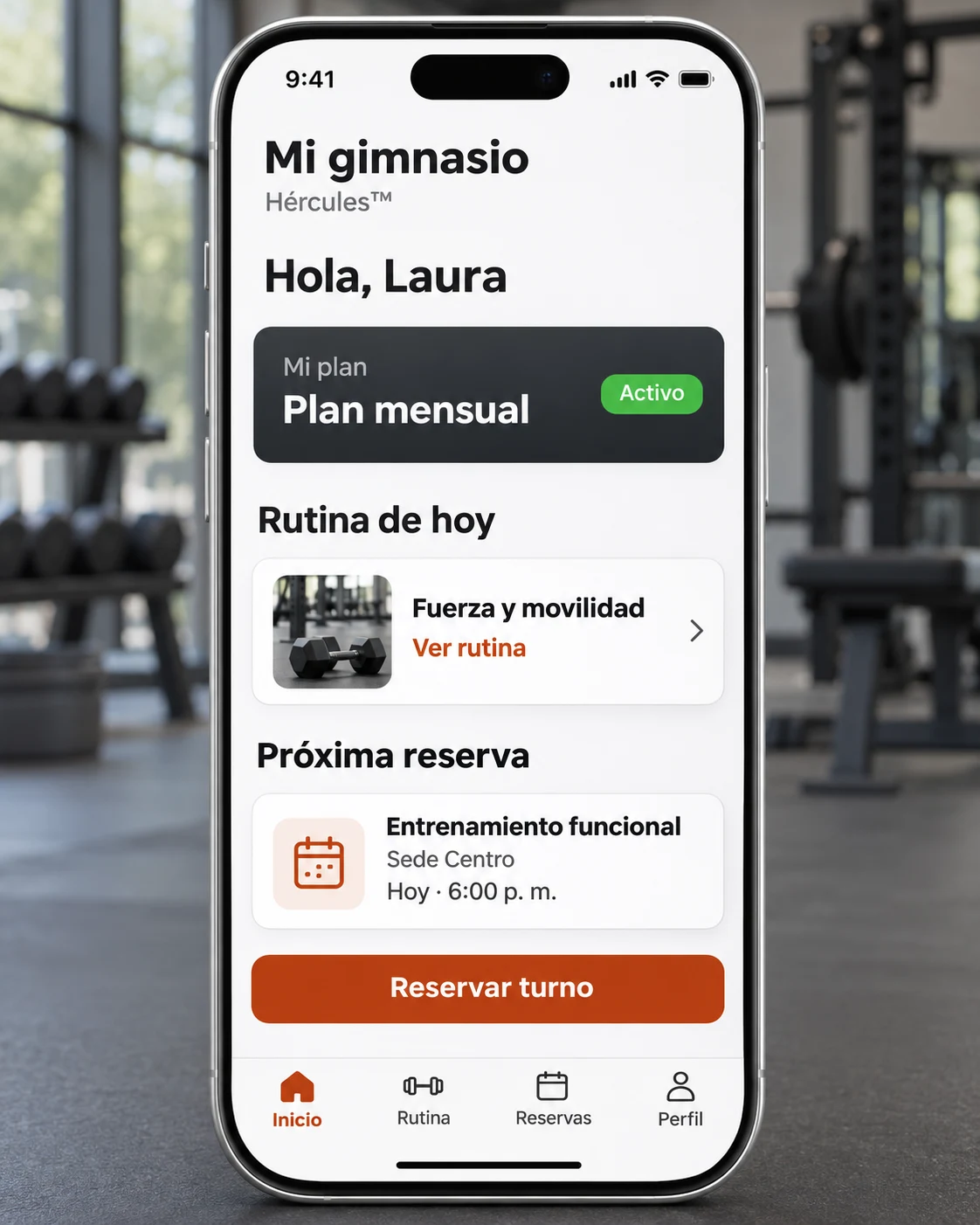
Members view their information, training centre and account-linked plans, with dates, objectives and coach.
Each session shows the exercises, sets and repetitions prescribed by the coach. Images and videos support the instructions.
Users select location, area or service, date and time. They can view slots in the calendar and review the day's booking.
Members view physical examinations, performance tests and enabled medical information recorded by the responsible professionals.
Implementation covers Android and iOS. We define visual identity, access and connections to contracted modules. The app has its own scope agreed in the proposal.
Assessments and prescriptions are the responsibility of your organisation's professionals. Each user views information enabled for their account.
From booking to centre entry, your team works with service conditions and assigned permissions.
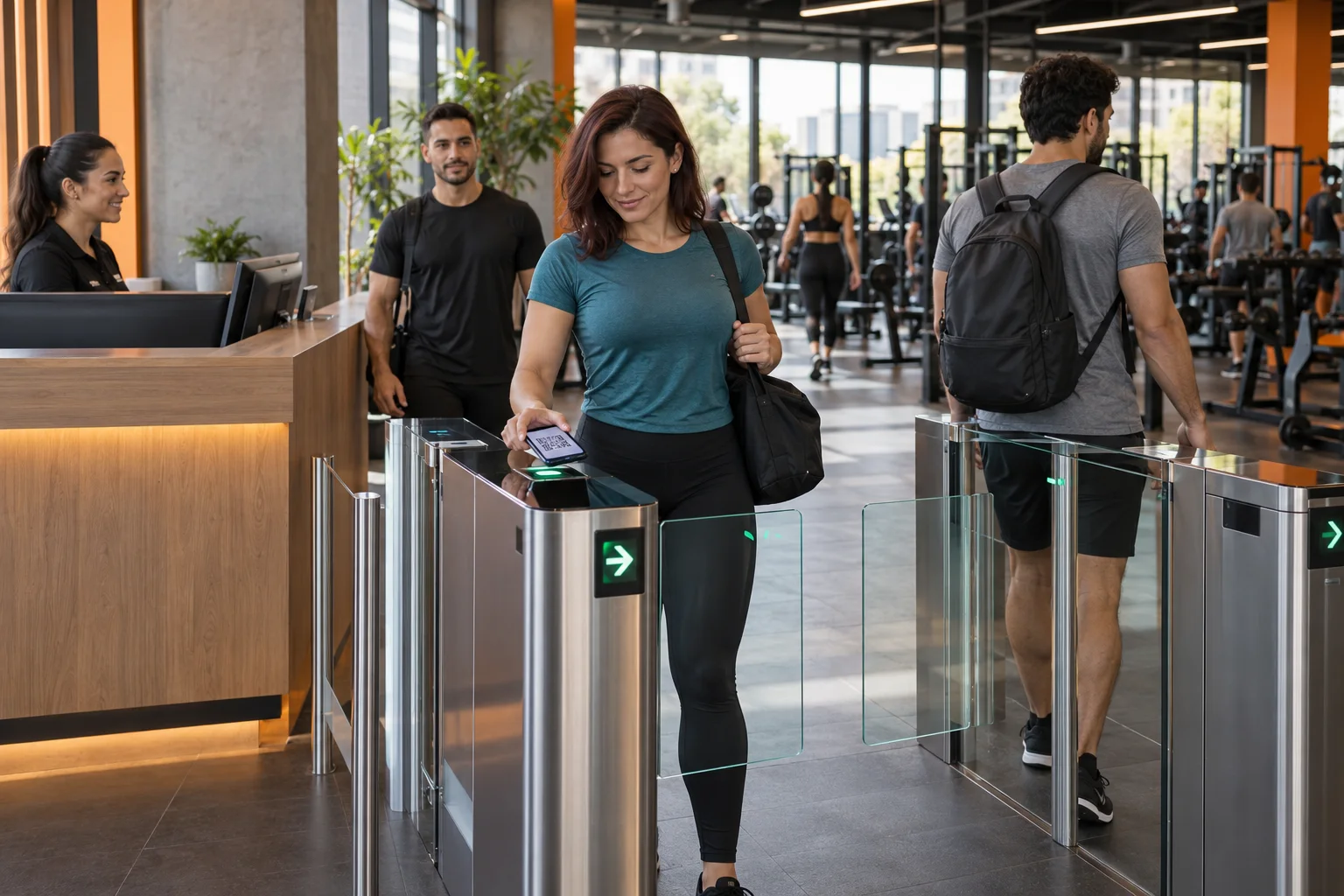
Check membership status and validate plan days, time slots and sessions. Record centre entries and view attendance.
Offer available times by location and centre. Define advance booking, simultaneous slots and cancellation deadlines according to service rules.
Assign staff to centres and configure permissions by role and location. Each team views information relevant to its responsibilities.
Review plans, memberships and attendance through enabled reports. Filter by location and dates to prepare service monitoring.
Purchase, booking and attendance are separate records. Available reports depend on your organisation's modules and configuration.
Statistics and reports
From one location to a network of 10, 20 or more gyms, organise service monitoring with operational reports and dashboards configured for your organisation.
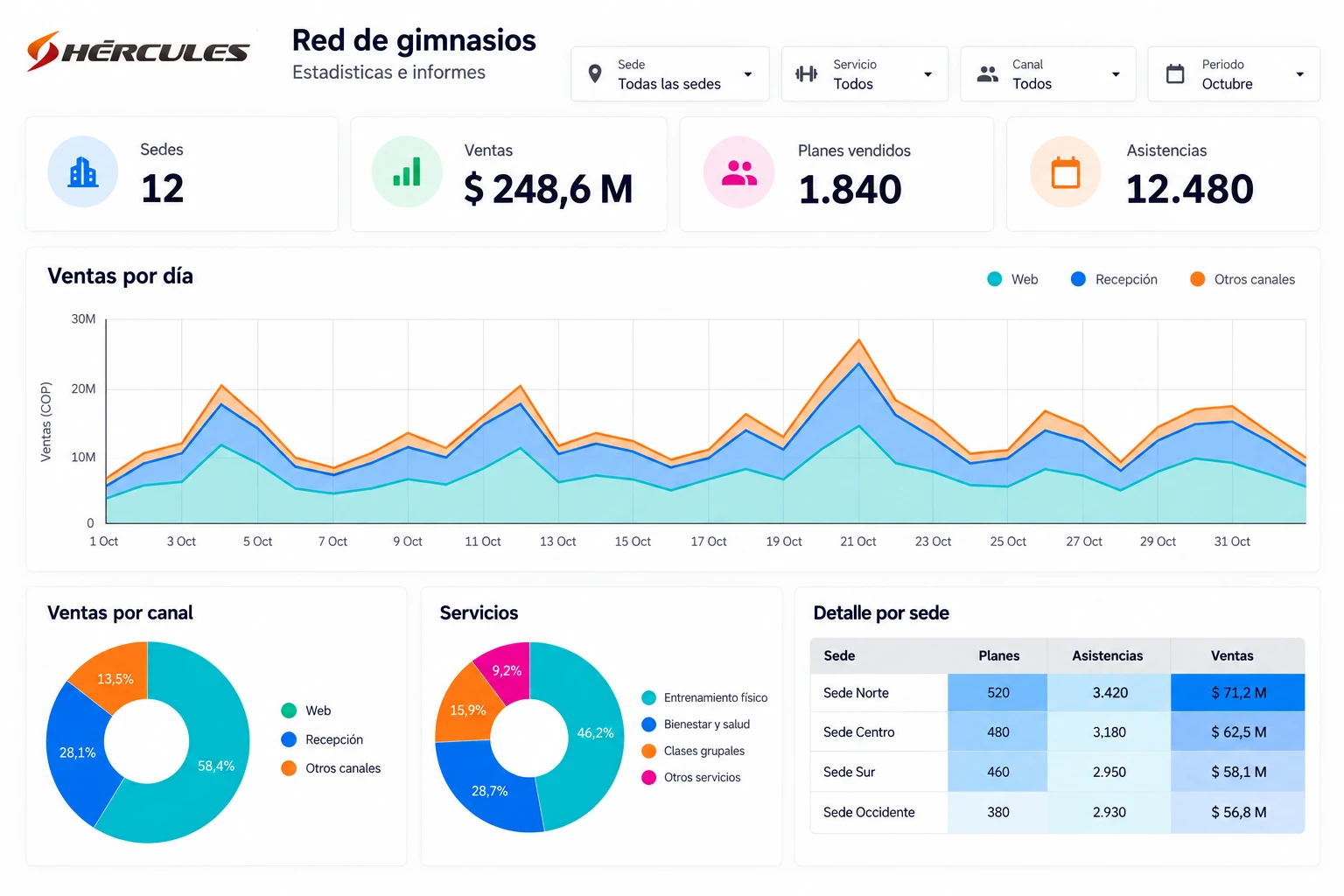
View plans, memberships, facility capacity and attendance. Filter by location, service and dates to review each gym's activity.
Analyse commercial information and sales status. Configure dashboards to explore revenue by channel, category or service and compare periods.
Select columns in available reports and export to Excel to prepare follow-up meetings and work with the information you need.
Assign report access permissions by role and location. Each manager accesses reports enabled for their area of work.
Available reports depend on enabled modules and permissions. For consolidated dashboards, we define sources, indicators, update frequency and required integrations with your team, particularly if gyms use separate instances of Hércules™.
Integrations with your systems
If your organisation needs it, we integrate Hércules™ with your invoicing and accounting or ERP systems. We define the connection with your finance and IT teams and the system providers.
Connect plan and service sales information with the system issuing your invoices. The project can include buyer details, items, amounts, invoices and credit notes, according to available interfaces.
We agree which system issues documents and how their references are recorded in Hércules™.
Exchange payment and accounting records according to your organisation’s needs. With your team, we define mappings for services, taxes, accounts and cost centres where applicable.
We review how to identify location and service in data received by your financial system.
We review interfaces or exchange formats supported by your provider. We agree data, direction and transmission frequency, validations and error handling. We then prepare the connector and test the journey with your teams.
Integrations are quoted under their own scope and may require specific development. Availability depends on the target system's access and interfaces. The gateway processes payment; invoice issuance and accounting entries are defined in their respective processes.
Deporte Virtual® defines the modules, configuration and connections your operations need with your team.
We review locations, services, plans and cross-centre benefits, along with each process's responsible staff.
We prepare capacity, schedules, booking rules and permissions. We define the integrations your organisation requires.
We agree training and review the membership, booking and attendance journey before launch.
You can share the information you already have:
The demonstration will follow a plan and its use across centres. The proposal will specify modules, location-specific configuration and integrations, together with training and launch.
Yes. The 10-location diagram is illustrative. Each centre has capacity, schedules and responsible staff, and each plan defines its benefits. With your team, we review the number of gyms and users, services and integrations to define the implementation scope.
Yes. Hércules™ supports a portal configured with your organisation's branding, information pages, location information and a service catalogue. Customers can choose plans or session passes, purchase and pay through a configured compatible gateway. The portal also lets them view plans, payments and slots according to enabled modules.
It can include a main benefit and secondary benefits at other centres. Configuration determines the centres, services, validity and uses enabled for the member.
Access control records entries and validates service conditions. Connection to devices, biometric systems or other providers is assessed as an integration project.
Hércules™ provides reports on plans, centres, facility capacity and attendance, with filters and permissions according to configuration. Consolidated analytics dashboards require defined sources and integrations. If you use separate system instances or events, we explicitly review which information can be queried.
To assess the transition, we review the information you retain today, what you need to bring into Hércules™ and which systems will stay connected. File uploads are defined by data type and format; each structure requires specific configuration and record validation.
The proposal defines modules and their conditions of use. The app, implementation, training and integrations each have their own scope.
Review what is defined for your networkAn example in use
More than 10,000 members per month. Compensar, a Colombian family compensation fund, operates its gyms with Hércules™ across multiple locations.
The implementation covers the gym features presented on this page: plans and memberships, bookings, attendance, training routines, assessments, the app, reporting and integrations.
Modules, the configuration of each location and connections are defined for each organisation. Licensing, the app and integrations each retain their own scope.
The next step
Tell us which locations and services you manage. We can explore your portal and store, plan purchases and use at enabled centres to define your network's scope.
